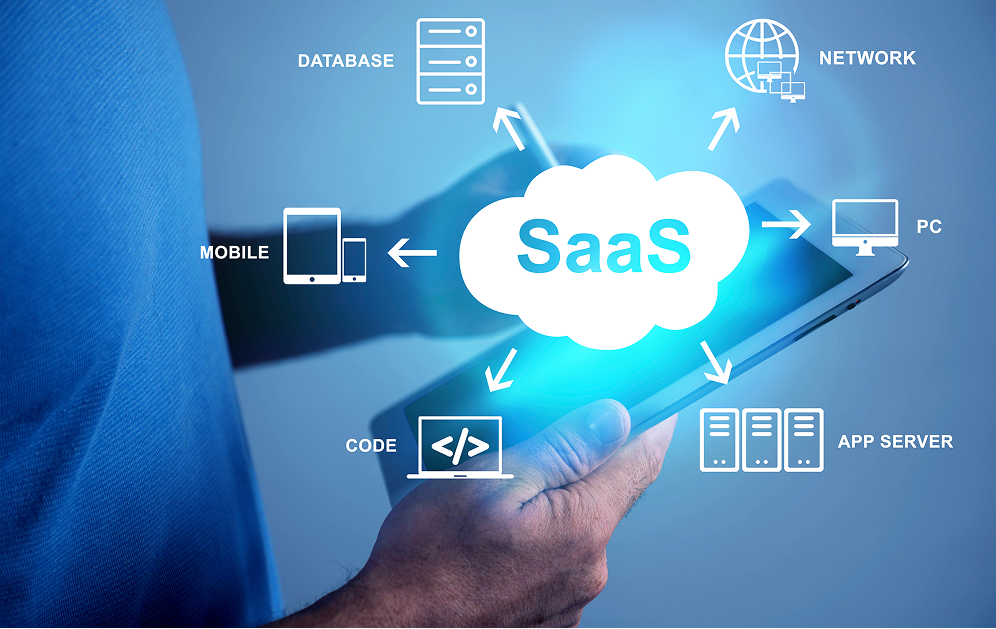

Today’s business is not competing with one another. but also compete speed, stability and readiness to change And behind all of these is the only important question that organizations around the world must answer. What are we building a business system on? on the cloud or on-premise?
The answer is not technical. But it’s the heart of growing up in this decade. because the system you choose today It determines how fast the business can grow tomorrow.
This article will help you get a clearer picture. understand the difference between the two approaches and make sure to decide which system is most suitable for your business.
1. Focus on cheap prices until you forget the hidden costs.
Many people start from the idea that “I want a beautiful website” and send a sample to the development team without ever setting a target audience. usage goals or the route of the user (User Journey) at allThe result is a beautiful website. But it can’t really work for the business. No contact, no one to buy, no conversions.
A good website must answer the question,
- What are customers coming in for?
- What do you need to see before making a decision?
- What should the path to conversion be?
web without goals It is the most wasteful website.
What is Cloud vs on-premise and what is the difference?
Before choosing, we must first understand the essence of both.
On-premise (installing the system in the organization itself)
Organizations must purchase servers, install, maintain and maintain their entire system. Set up a network, back up, update the software. and manage everything within the organization
Merit
- full control of the system
- Information is within the organization itself.
Limitation
- high initial investment
- Must have an IT team to take care of them all the time.
- Expanding the system is slower and has a very high cost.
Cloud (Infrastructure on the Internet)
The organization does not have to buy a machine. But use infrastructure through cloud providers such as AWS, Azure, Google Cloud It is a form of “pay according to actual use” and expand the system immediately when the business grows.
Merit
- start working quickly
- Unlimited scaling
- Reduce the burden of administration and hardware costs.
- Supports many branches / Remote Work very well
Limitation
- It must be designed appropriately to control costs.
- An expert is required to help lay the architecture right from the beginning.
Compare Cloud vs On-Premise in the most easy-to-understand manner
1) Budget and Total Cost (TCO)
- On-premise Big investment + maintenance cost + upgrade fee
- cloud no advance cost pay as much as you use
If you don’t want to invest in buying a device in the first place, Cloud is often more worthwhile.
2) Starting speed
- On-premise Set up the machine, set it up, take a week.
- cloud Ready to start in minutes
Businesses that need fast go-to-market, often choose the cloud.
3) the ability to expand the system (scalability)
- On-premise need to buy and install additional machines
- cloud Instantly increase/decrease processing power
Suitable for businesses with high peak loads such as e-commerce.
4) Care, Security and Backup
- On-premise It’s all at the IT team of the organization.
- cloud Providers have international security standards + automatic backup.
Cloud greatly reduces the workload and reduces the risk of information.
What kind of business is suitable for on-premise?
On-premise still answers many questions, such as
- Organizations that need to control 100% of the data
- There are specific legal or safety requirements.
- The system is connected to specialized equipment in the factory.
- There is a large IT team and ready to take care of every server.
Simply put, it is If control is more important than flexibility, on-premise may be more suitable.
Which business is suitable for the cloud?
Cloud is the answer for businesses that need speed, stability, and unrestricted growth.
- Online businesses where traffic is skyrocketing according to the campaign.
- Organizations that do not want to invest in hundreds of thousands of machines
- Companies that have to work from multiple locations
- Systems that require high uptime not to lose sales opportunities.
- team to develop A new feature is fast to compete in the market.
Cloud is very suitable for businesses in need. “Growing up without being dragged by the original system”
Summary of Cloud vs On-Premise, which one to choose?
There is no one of the best for every organization, but there is a “suitable” model for your goals.
- To control everything inside On-premise
- If you want speed, flexibility and control costs cloud
The main thing is to really understand your own system.and choose a structure that makes the business ready to grow not just usable
Achiever, a team of helpers to lay out a cloud and on-premise objectively. We don’t think cloud is better or on-premise is better, but we look at it. “What is most suitable for your business?” separate important
We can help you in every step, such as
- Assess the readiness of the system
- Planning and designing architecture
- Choose which system should be Cloud / On-Premise
- Do Migration without interruption
- Adjust the system to be stable and cost-effective.
Our goal is to make your system structure. “Always Ready to Grow”
First step into a system that supports the future Let’s start with a confident decision today.
If you want to see clearly that Cloud or On-Premise is more suitable for your business. Achiever is ready to help every answer lead to real growth.
Start searching for the right solution for your organization.
Moving the system to the cloud, what do you need to know? Check out 10 things that businesses often overlook.
Today, whether you are a Startup, SME or a large organization. Everyone said in unison, “I have to go to the cloud.” But when it’s time to actually act Many businesses face unexpected problems, including slow systems, blooming expenses. or not finished moving until you have to go back and fix it all
Because migration to the cloud isn’t just about migrating data from A to B, but “designing a new system to suit the digital world” and if you’re preparing for Cloud Migration, here are 10 key checklists. to know before starting Otherwise, it may be a waste of time. Waste of money unnecessarily
Understand the current system of your own system clearly first.
Many businesses rushed to the cloud. Even though I still don’t know how my app works How much resources are used? What other systems do you rely on?
Doing System Assessment is therefore the most important first step.
- What elements must be moved?
- what should be adjusted
- What should be discarded or rewritten?
know the real picture first It will save a huge amount of money after going to the cloud.
Choose a strategy to move (Migration Strategy) for the right business.
Cloud Migration is not the only way. Nowadays, 6R is used, for example.
- rehost
- RePlatform (Partially Adjusted)
- Refactor (rewrite it for maximum benefit)
Each type has both cost and results are different. if wrong decision May have to pay two rounds to fix the new system.
Check if the application supports the cloud, is it true?
Some systems have been built since the server on-premise, still occupying the world. Written with a framework so old that it doesn’t support scaling, load balancing or container at all.
If you don’t check it in the first place, you may find that “moving but not working as it should”
Keep the security structure firmly.
On the cloud, security is not an extra. but is the heart You have to answer the question,
- Is the important information encrypted?
- Who has access to what system?
- Is there a Least Privilege permission?
- Is there an abnormal detection system?
- Many Thai businesses move to the cloud but still use the same password for the whole team. which is very dangerous
Assess the cost in a realistic way (not hoping to “Always Cheaper”)
Cloud is not cheaper in all cases.
That’s right…if you know how to use it.
Expensive…if you don’t control the resource
must take into account
- Compute/Storage/Traffic
- Backup value
- Security Tools
- Managed Service
Many companies were shocked when they saw the bill for the first month. because the device is turned on without setting Auto-Scaling or not turning off the free time
Network design must be thought from the beginning.
Many systems are slow, not because of the cloud, but because the network design is wrong, it has to be placed.
- VPC
- subnet
- Security Group
- Gateway
- Connecting to the original system
If the design is good, the system will be fast, safe and easy to expand.
Testing Plans are as important as moving plans.
After Migration, everything must be tested.
- Speed
- Connection
- accuracy of information
- Collaboration of multiple systems
Many organizations make mistakes because “Move over but not tested enough”
Data Migration must be the most thorough.
Information is the heart of a business. Only 0.1% migration is wrong can create a big problem.
Should do
- Mapping
- Validation
- backup
- verify before pressing submit the actual work
And don’t forget to prepare the Data Retention Policy clearly.
Plan to cope with the same system that must be temporarily used in pairs (Hybrid Period).
In the real world, hardly anyone has moved 100% at once. You need a hybrid range where the old system and the new system work together. Need to think about syncing data, time agreement system, solutions to immediate problems Businesses that do not plan this section Often there is a mismatch of information that the job crashes very easily.
Prepare the team (both Dev, Ops and users)
Up to the cloud does not mean that everything will be better “immediate”.
- devops
- CI/CD
- monitoring
- Incident Management
and must train the team to use the cloud correctly as well
Examples of real situations that many businesses encounter
One company uses a POS system + a stock system that runs on a machine in the office. All branches must have a VPN back to the head office. Makes the system slow often. When going to the cloud, the speed is much better. But the cost is higher than expected. because the big machine is on all the time Even during the night, no one uses it at all. After adjusting to Auto-Scaling and reducing the machine size, the bill is immediately reduced by more than 45%. This is an example that proves that the cloud is good, but must be used as
So which cloud should I choose? The main thing is to look at 3 stories.
- stability
- security
- Ecosystem system that makes your work easier.
AWS, Google Cloud, Azure each have their own strengths. It’s important to choose the right one. “Your Business Context” Cloud Migration is to lay a new foundation for the business to grow for many more years
Clouding is not just a technical matter, it’s a “growth strategy” if you put up a good system from day one. The business will be ready to expand Supports more users, is safer and works faster effectively.
Achiever makes it easier to get on the cloud. We have over 21 years of experience in developing and maintaining businesses of all sizes. we can help you both
- analyze the current system
- Plan Cloud Architecture
- Move the system without interrupting the business.
- Cloud management to be stable, safe and cost-effective
- Support from startups to large corporations
We believe that Cloud should be “Business driving force” is not a burden, and we are ready to walk with you from the first day until the day the system grows further.
Ready to bring your business to the cloud with confidence?
Talk to Achiever experts today and start building a faster, safer system and ready to grow from day one.
Do you have any website ideas or systems that you want to develop?
Come talk to us to let your ideas really generate sales. Call: 080-9130199
 Line: @Achiver
 https://lin.ee/E6EAE0F